



Answer in 30 Seconds
Don't overthink it! If the job went well, the customer will usually be happy to. If this awkwardness comes from chasing customers who forget, get a system in place to remember and then send them a non pushy text.
- Ask: “Were there any issues with the service?” If all’s well, say: “Would you leave us a Google review? It helps others decide who to call.”
- Send the review link afterwards, or give them a business card with a QR code they can scan later.
- Follow up if they said they would. We all get busy and forget.
You’ve finished the job, the customer’s happy and you’re having a perfectly normal chat at the door. Then you think about asking for a Google review, and somehow it feels like you’re about to ask them to lend you money.
So you say, “Thanks again,” head back to the van and tell yourself you’ll ask the next one.
If that sounds familiar, it makes sense. You care about leaving a good impression, and you don’t want the last thing a customer remembers to be you asking for a favour. The trouble is, staying quiet means all the good work you’ve just done may never help the next customer choose you.
The easiest way to ask is to check how the service went, explain why a review helps and send the link afterwards. You can keep it friendly without making a big speech or apologising for the request.
Let’s make that conversation easier.
Key takeaways
- Build reviews into finishing the job. Strengthen your local visibility, customer trust and the reputation people see alongside your ads.
- Check how the service went. Give customers a chance to raise anything that needs attention.
- Explain who their review helps. Someone else is trying to decide which business to trust.
- Follow your conversation with a direct link. Help customers act on their good intentions.
- Send one friendly reminder. A forgotten request doesn’t need an awkward chase.
- Give your team the words and a clear handover. Agree who asks, sends the link and follows up.
Why asking feels awkward
There’s a reasonable thought behind the hesitation: They paid me to do a job, and I’ve done it. That was the deal. Isn’t asking for something else a bit cheeky?
When you think of a review as an extra payment, of course it feels uncomfortable. You’ve already agreed the price.
But think about what happens when someone recommends a good plumber to their neighbour. Nobody feels the plumber has reopened the invoice. They’re simply passing on something useful: “We used this person, and here’s how it went.”
A Google review does the same thing for someone who doesn’t happen to live next door.
That’s a much easier reason to give than a long explanation about your marketing:
“It helps other people decide who to call.”
There can be a little pride involved too. We’re comfortable being the person who helps, but less comfortable being the person who asks for help. It’s easy to worry that needing reviews makes the business look small, or that a “no” will spoil an otherwise good conversation.
Research on asking for help found that people underestimate how willing others are to help and overestimate how inconvenienced they’ll feel.
In other words, the request may feel much bigger from your side of the doorstep than theirs. You’re allowed to ask, and they’re allowed to decide. Once you’re comfortable with both parts, there’s much less to be nervous about.
Give your good work a chance to win more work
You might be thinking, “Surely doing a good job should be enough?”
It gives you something worth talking about. Collecting reviews makes that good work visible to people who haven’t hired you yet, and the benefit reaches further than one person reading one review.
Growing a business often comes down to small improvements that reinforce each other. You get found a little more often, give people more confidence to call and turn more enquiries into jobs. Reviews contribute to that process in several places.
First, they build up your Google Business Profile. Google confirms that more reviews and positive ratings can help your local ranking, so asking consistently supports the work you’re doing to appear in local searches.
Then there’s the decision itself. Imagine someone with a blocked drain comparing you with another business. They can’t inspect your workmanship before calling, but they can read about how you treated previous customers. Reviews describing reliable arrivals, tidy work and problems properly sorted give them reasons to choose you beyond the price.
That proof can support your advertising too. Google Local Services Ads show your star rating and can display your review count. If you’re paying to get in front of local customers, the reputation beside your name becomes part of what they’re judging. Building it gives the attention you pay for a better chance of becoming an enquiry.
Those gains can build on each other: more reviews strengthen your visibility and reputation, helping you win more work; more work gives you more customers who can leave reviews. Keep asking, and each round of jobs gives you a chance to strengthen the next.
This is why it deserves more than “I’ll get round to it.” If a competitor keeps collecting reviews while you leave it for six months, they spend those months building evidence that helps them get found and chosen.
In 2026, your online reputation is part of how you win work. You’ve already put the effort into earning it. Make collecting the proof a normal part of finishing the job.
Start with a question you already care about
For some people, the worry isn’t asking for a favour. It’s asking for a review when they aren’t quite sure the customer was happy.
That’s worth finding out anyway. Before you leave, try:
“Before I go, were there any issues with the service?”
You’re opening a conversation you should want to have, whether reviews exist or not. It also gives you something real to respond to, which feels much more natural than suddenly launching into a review request.
If everything went well
Carry on with:
“Good to hear. Would you leave us a Google review? It helps other people decide who to call. I’ll send you the link.”
Use the words you’d normally use. If “Good to hear” sounds a bit formal coming from you, “Lovely, thanks” is fine. The point is to give a clear invitation and explain what happens next.
Then thank them and get on with the handover. They can write the review later, when they have a moment.
If they raise an issue
You haven’t ruined the conversation by asking. You’ve found something you can help with before leaving.
“Thanks for telling me. What happened?”
Listen, understand the problem and explain the next step. If someone else needs to deal with it, tell the customer who will contact them and when.
This takes pressure off your team too. They don’t have to keep smiling through a complaint while trying to remember a review script; they have a clear job to do.
Keep an honest review invitation in your normal follow-up for these customers as well. Checking the service helps you respond properly, rather than deciding which customers are allowed to review.
What if they haven’t checked the work yet?
Give them a chance to experience it. A window clean is usually easy to judge straight away; other work may need a handover or time for the result to become clear.
“No problem. Have a look when you get a chance, and let us know if anything needs attention.”
Send the review request when they’ve had a fair chance to judge the service.
Should you ask for a five-star review?
Ask for their experience and let them choose the rating. That keeps the conversation comfortable: they don’t have to promise a particular score, and you don’t have to persuade them.
Google’s rules allow genuine review requests, but prohibit influencing the rating, selectively asking for positive reviews or pressuring customers to write one while you’re there.
Follow up while the conversation is fresh
When a customer says, “Yes, of course,” they may fully intend to leave a review. Then you leave, their phone rings and the day carries on.
Help them follow through by sending the link afterwards:
“Hi Sarah, thanks for having us today. Here’s the Google review link I mentioned: [link]. We’d really appreciate your honest feedback. Thanks, Ellis.”
Get your direct review link from your Google Business Profile. Sending them straight to the right place saves them searching for your business and working out where to write it.
They said they would, but haven’t. Is a reminder pushy?
One friendly reminder after a few days is reasonable. Think about how many messages you’ve meant to answer, only to remember while doing something completely unrelated.
In a 2022 Checkatrade survey of 2,000 adults, people named forgetting and reviews not being a priority among their reasons for not reviewing.
You can send:
“Hi Sarah, just sending the review link again in case it got buried: [link]. If you’ve already left one, thank you. Otherwise, we’d appreciate your honest feedback when you get a chance.”
There’s no need to mention that they promised, or ask why they haven’t done it. You’re making the link easy to find again. After that, leave it with them, and stop sooner if they decline or you know they’ve reviewed.
For salons, studios and shops, let the card do the asking
If you run a hair salon, tattoo studio or local shop, you can make the review ask part of the checkout instead of squeezing it into a conversation.
Add a QR code to your business card that opens your Google review page. As you hand it over, say:
“Thanks for coming in. There’s a QR code on the card if you’d like to share how it went. It takes you straight to our Google page.”
That gives the customer a simple next step without asking them to stop what they’re doing and write a review on the spot. They can scan it now or later.
Give the card to customers as a normal part of checkout, and let each person decide whether to leave a review and what to say. Before printing a batch, scan the code yourself and make sure it opens the right review page.
What to say in the awkward moments
Having a few familiar lines makes it easier to adapt without overthinking every conversation.
| Situation | What you can say | What to do next |
|---|---|---|
| They’re rushing out | “Would you leave us a Google review when you’ve got a moment? I can send the link.” | Keep it brief and send the link afterwards. |
| You forgot to ask yesterday | “Hi Sarah, thanks again for having us yesterday. Would you leave us a Google review? Here’s the link: [link].” | A message is still a perfectly good way to ask. |
| They don’t know what to write | “A few honest words about your experience are fine. It doesn’t need to be an essay.” | Leave the wording to them. |
| Nobody was home | “Today’s window clean is finished. When you’ve had a look, we’d appreciate a Google review: [link].” | Give them time to see the work. |
| They say no | “No problem. Thanks again for having us.” | Carry on with the same friendly service. |
What if the customer struggles to leave a review?
They’ll need to sign in to a Google account, although that account doesn’t need a Gmail address.
If they ask for help, explain that step and check you’ve sent the correct link. You don’t need to turn the doorstep into a tech support session; they can come back to it when it suits them.
Help your team feel comfortable asking
“We need more reviews” sounds clear when you say it in a team meeting. At a customer’s door, it doesn’t tell anyone what to do.
Some staff will worry about sounding pushy. Others will worry about inviting a complaint or getting blamed for a bad review. Talk through those worries before assuming people just aren’t bothering.
Then agree a simple handover:
| Part of the process | Agree this with your team |
|---|---|
| Check the service | Who asks whether anything needs attention? |
| Handle issues | Who helps, and what can staff promise the customer? |
| Send the review link | Does the person finishing the job send it, or does the office? |
| Follow up | Who sends the reminder and checks when to stop? |
Practise the conversation together once or twice. It may feel a bit silly in the office, but that’s a better place to find words that don’t sound like you.
Use a one-page conversation guide in the van or team chat, with the service-check question, the review invitation and what to do if there’s a problem. A useful guide answers the thing staff are worried about in the moment: What do I say next?
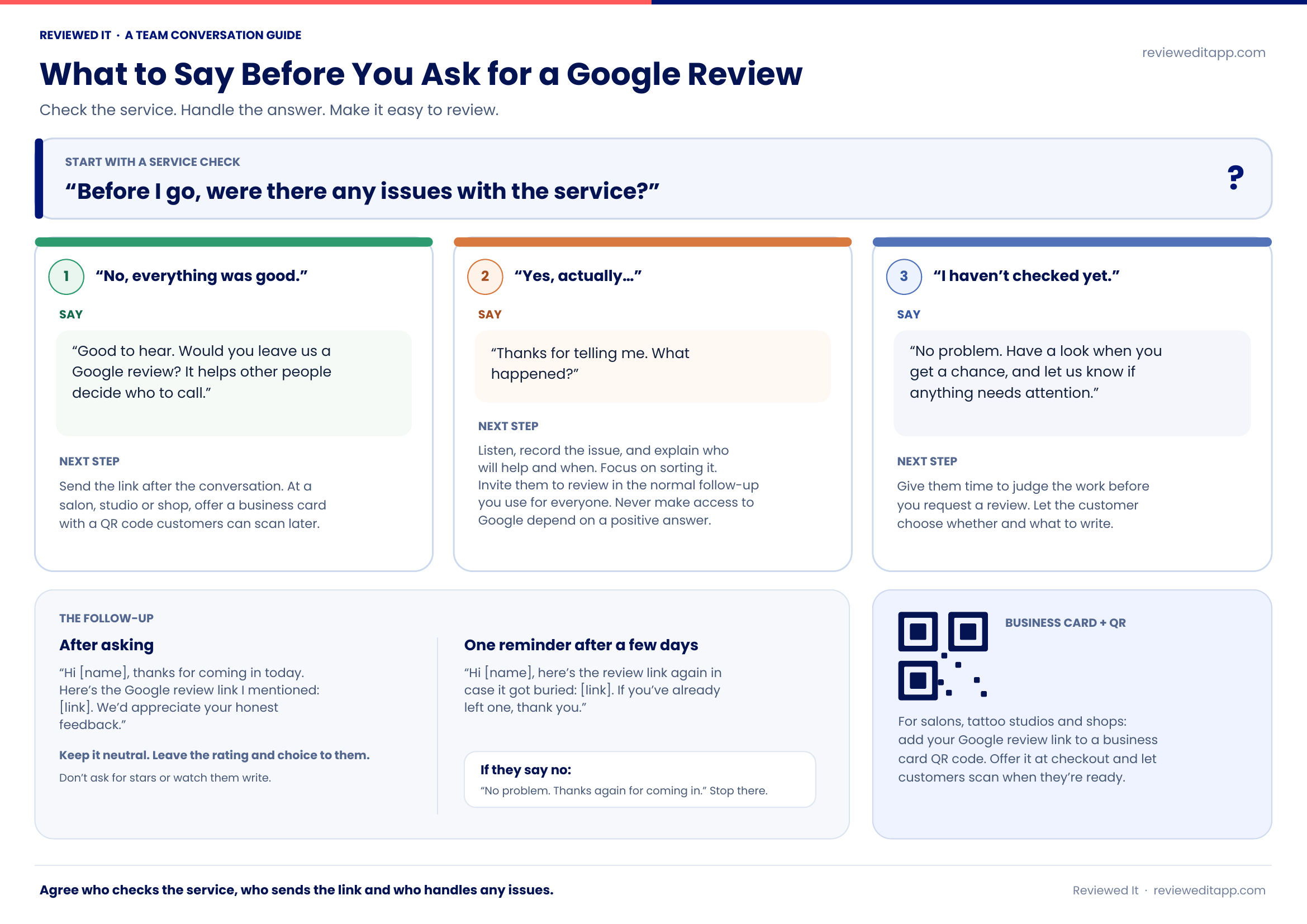
A practical resource for your team
Download the team conversation guide
Take these scripts to your next team huddle. Print the one-page guide for the van or share it in your team chat.
Download the one-page PDFMake the follow-up easier to keep doing
You don’t need a complicated setup to start. Save your review link and messages, agree who sends them and keep a simple record so customers don’t get chased twice.
As the business gets busier, the admin can become the weak point. Everyone means to send the request, but there’s another call, another job or an invoice to sort out first.
Reviewed It helps you keep that follow-up going. Add the customer, choose the message and send; it handles reminders and tracking. You can also connect Xero or QuickBooks to trigger requests from paid invoices.
The conversation can stay personal while the follow-up becomes easier to manage. Each job gives you another chance to build the reputation that helps win the next one. A routine you can keep doing lets those gains build up, even when the diary is full.
See how Reviewed It works or try it for seven days. UK monthly plans cost £34.